Make a custom shoe. Track every mile on it.
A custom shoe in Stride is a stylized collectible created from a photo of your own shoe or a product-page link. Add it to your collection, select it, and Stride tracks its mileage as you walk and run.
 Download for iPhone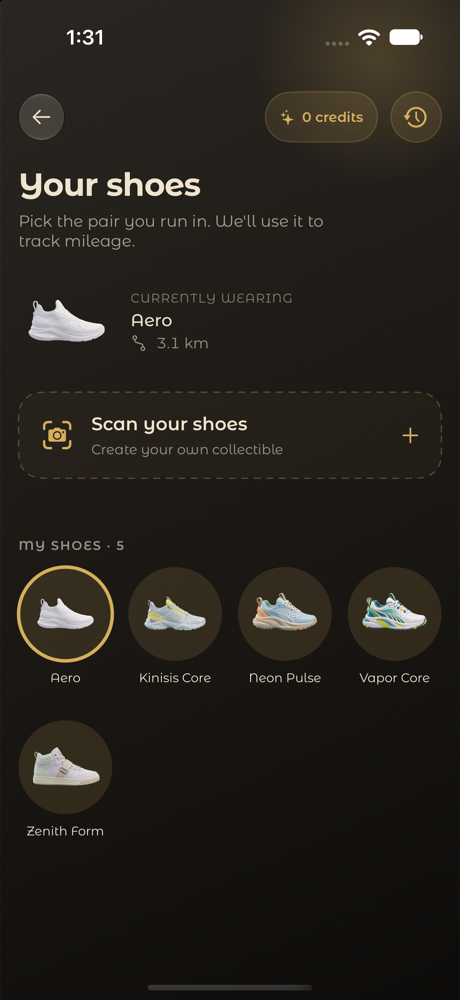
How to create a custom shoe in Stride
- Open the shoe creator in Stride (requires Stride Pro).
- Upload a photo of your shoe or paste a product-page link.
- Stride creates a stylized collectible inspired by it.
- Name it and add it to your collection.
- Select it as the shoe you’re wearing to track its mileage.
What you can do with shoes in Stride
Your own shoe, as a collectible
AI generation turns your photo or link into artwork.
Mileage per shoe
Select the pair you’re wearing and follow its distance.
Bundled collection
Start with Aero for free; Stride Pro unlocks every premium bundled shoe.
Shown in Live Activities
Shoe Focus and Shoe Spotlight bring your shoe into view on the Lock Screen.
Frequently asked questions
How do I make a custom shoe?
Upload a photo of your shoe or paste a product-page link in Stride. It creates a stylized collectible you can name and add to your collection. This requires Stride Pro.
How many custom shoes can I generate?
Stride Pro includes 10 credits per paid subscription month for AI shoe generation.
Does Stride track mileage on my shoes?
Yes. Select a shoe in your collection and Stride tracks its mileage.